

eSign

Login to your eSign account at the following Link.
Constellation1 eSign (esignonline.net)https://esign2.esignonline.net/Account/Login
Important Announcement Regarding
Electronic Signature Member Benefits
eSign
Effective May 1st, 2021, the Arizona REALTORS® eSign member benefit program will undergo changes.
Authentisign
Logging into Authentisign (which is integrated within TransactionDesk) is easy with the Arizona REALTORS® Single Sign-On included in your member dues.
I am a new user and want to create an eSign account:
Contact eSign Support at esignsupport@constellation1.com
I already have an eSign account and want to purchase the Unlimited Plan:
Individual Plans:
- Login to your account at https://aar.esignonline.net/
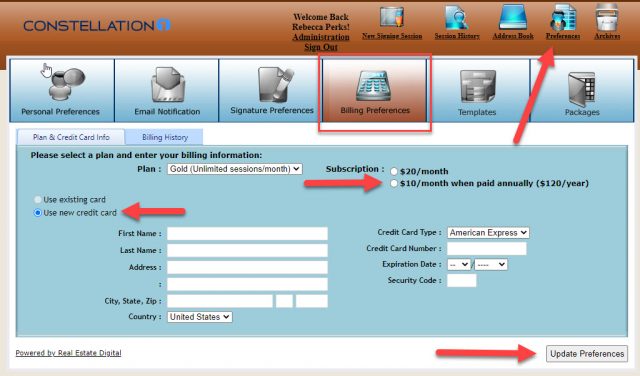
- Click “Preferences” at the top right
- Select ‘Billing Preferences’
- Select the “Gold” Plan and the $120/year annual subscription (this is the discounted rate for AAR members). Select ‘Use a new credit card’ and enter your billing details.
- Select ‘Update Preferences’ to submit your request. Please allow up to 24 hours to process your request, even though most upgrades are done on the same business day.
Team and Broker plans:
If you are looking to subscribe for your team or company, we have plans starting at $99/month. Team plans have added benefits of company branding, shared templates and account management. Please contact sales@constellation1.com to get a customized quote for your company.
For support related questions, please contact
esignsupport@constellation1.com
Phone support is only provided to upgraded customers at 1-800-503-5163
Support Hours: Monday – Friday 9:00am – 7:00pm EST
To use the Authentisign member benefit at no additional cost, login to your Transaction Desk account here.