

New Login Instructions

Starting January 25th, a new, simple login experience that uses your existing RAMCO Portal account will become available.
To sign into AAROnline.com using the new login, follow along with the instructions below:
Step 1: Click “Login” on the home page, pop-up, or click here.
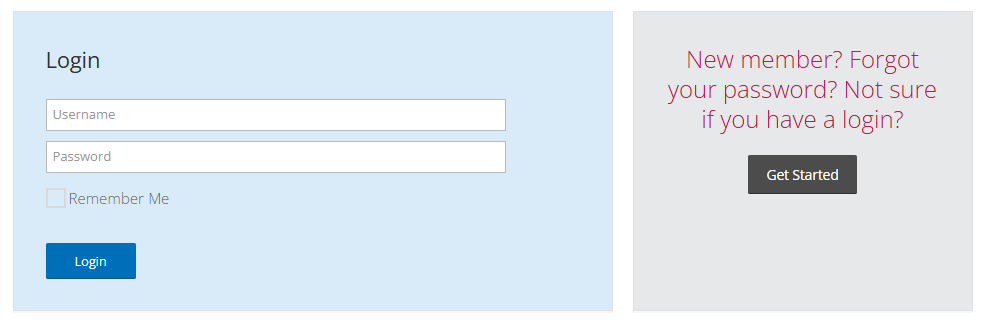
Step 2: If you know your RAMCO login, enter your username and password. Your username will be your M1 (NRDS) number. You will be redirected to the AAROnline.com home page upon successful login.
If you are a new member, have forgotten your password, or are unsure whether you have a RAMCO login, click “Get Started”.
Step 3: You will be directed to search for your account by entering either your Last Name and Email Address or Last Name and M1 (NRDS) number. If you do not know your M1 number, you can find it on NAR.Realtor.
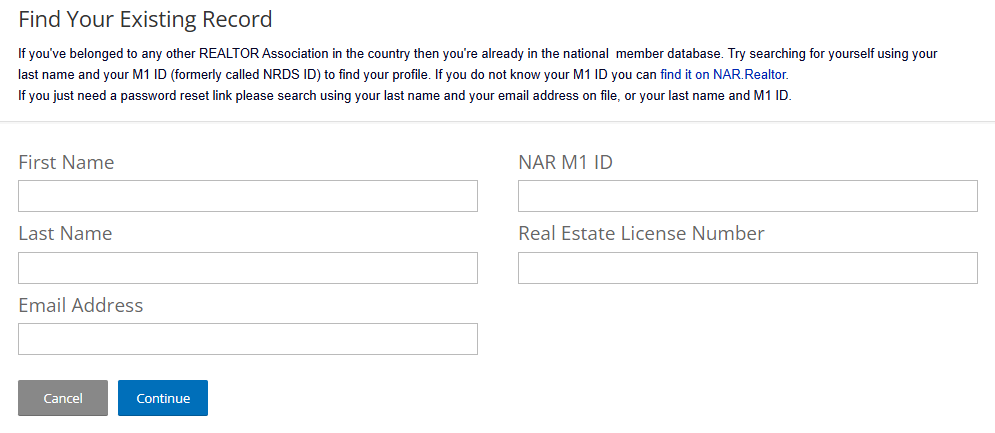
Step 4: If you do not have an existing account on the RAMCO portal, you will be directed to create a new account.

If you do have an account, you will be directed to have a Password Reset Link sent to your email address on file. If your email and username appear correct, click “Continue” to have your Password Reset Link emailed to you.

If your email address is incorrect or you no longer have access, please contact Business Services Support at support@aaronline.com or 480-304-8930.
Step 5: Once your password is reset, navigate back to AAROnline.com and click “Login” to sign in with your new credentials.